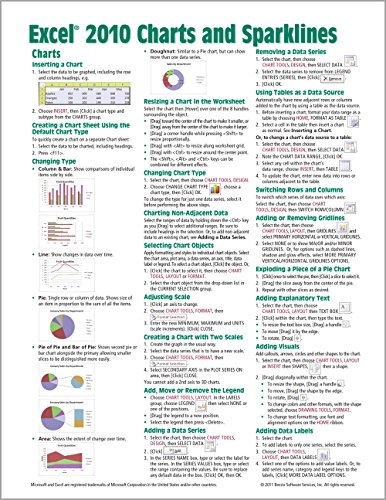
Laminated quick reference card showing step-by-step instructions and shortcuts for how to use charts/graphs and Sparklines features of Microsoft Office Excel 2010.
The following topics are covered:
Charts: Inserting a Chart, Creating a Chart Sheet Using the Default Chart Type, Changing Type, Resizing a Chart in the Worksheet, Changing Chart Type, Charting Non-Adjacent Data, Selecting Chart Objects, Adjusting Scale, Creating a Chart with Two Scales, Add, Move or Remove the Legend, Adding a Data Series, Removing a Data Series, Using Tables as a Data Source, Switching Rows and Columns, Adding or Removing Gridlines, Exploding a Piece of a Pie Chart, Adding Explanatory Text, Adding Visuals, Adding Data Labels, Move, Format, Edit Data Labels, Adding/Removing a Chart Title, Adding an Axis Title, Moving a Title, Using Styles and Layouts, Moving the Chart to Another Worksheet, Adding a Projection or Trendline to a Data Series, Removing a Trendline, Handling Hidden and Empty Cells, Setting the Default Chart, Creating a Chart Template, Applying a Custom Chart Type.
Sparklines: Creating a Sparkline, Removing Sparklines, Grouping Sparklines, Changing Sparkline Type.
Customizing Sparklines: Adding Text, Highlighting Values (Markers). Changing Marker Color, Change Sparklines Color and Weight, Customizing Axis Settings, Handling Hidden and Empty Cells.
This guide is suitable as a training handout, or simply an easy to use reference guide, for any type of user.
This guide is one of several titles available for Excel 2010: Excel 2010 Introduction; Excel 2010 Tables, PivotTables, Sorting & Filtering; Advanced & Macros; Charts & Sparklines; Functions & Formulas.
Microsoft Excel 2010 Charts & Sparklines Quick Reference Guide (Cheat Sheet of Instructions, Tips & Shortcuts - Laminated Card)
📄 Viewing lite version
Full site ›
3.6
USD
🛒 Buy New on Amazon 🇺🇸
Book Details
Author(s)Beezix,
PublisherBeezix Inc.
ISBN / ASIN1936220423
ISBN-139781936220427
Sales Rank943,662
CategoryEverything Else
MarketplaceUnited States 🇺🇸
Description ▲
Similar Products ▼
- Microsoft Excel 2010 Tables, PivotTables, Sorting & Filtering Quick Reference Guide (Cheat Sheet of Instructions, Tips & Shortcuts - Laminated Card)
- Microsoft Excel 2010 Functions & Formulas Quick Reference Guide (4-page Cheat Sheet focusing on examples and context for intermediate-to-advanced functions and formulas- Laminated Guide)
- Microsoft Excel 2010 Introduction Quick Reference Guide (Cheat Sheet of Instructions, Tips & Shortcuts - Laminated Card)
- Microsoft Excel 2010 Advanced & Macros Quick Reference Guide (Cheat Sheet of Instructions, Tips & Shortcuts - Laminated Card)
- Microsoft Word 2010 Introduction Quick Reference Guide (Cheat Sheet of Instructions, Tips & Shortcuts - Laminated Card)
- Microsoft Word 2010 Formatting Quick Reference Guide (Cheat Sheet of Instructions, Tips & Shortcuts - Laminated Card)
- Microsoft Word 2010 Advanced Quick Reference Guide (Cheat Sheet of Instructions, Tips & Shortcuts - Laminated Card)
- Microsoft PowerPoint 2010 Introduction Quick Reference Guide (Cheat Sheet of Instructions, Tips & Shortcuts - Laminated Card)
- Microsoft PowerPoint 2010 Advanced Quick Reference Guide (Cheat Sheet of Instructions, Tips & Shortcuts - Laminated Card)
- Microsoft Word 2010 Templates & Macros Quick Reference Guide (Cheat Sheet of Instructions, Tips & Shortcuts - Laminated Card)
More Books in Everything Else
Khasakkinte Ithihasam
View
Modern Automotive Technology
View
Mother Earth Spirituality: Native American Paths to He…
View
Buy Even Lower: The Regular People's Guide to Real Est…
View
Ice Sculpture: Secrets of a Japanese Master
View
Mick Sinatra: The Harder They Fall (The Mick Sinatra S…
View
Town Planning
View
A Course in Electrical Machine Design
View