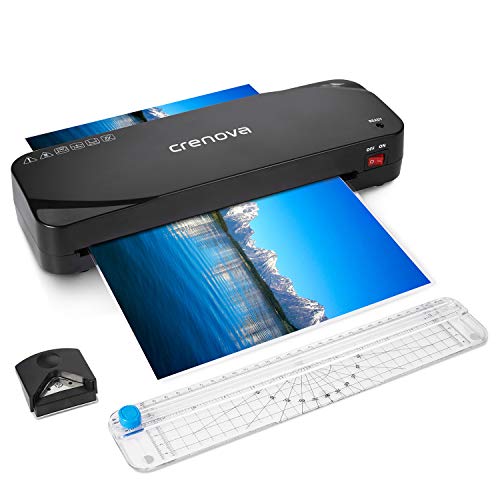


Laminator, Crenova A4 Laminator, 4 in 1 Thermal Laminator, 9 inches, 20 Laminating Pouches, Paper Trimmer, Corner Rounder
Price not available for Germany
You can still browse on Amazon. Try another country above.
Book Details
Description
The Simpler The Better
The newly-launched Crenova A4 Laminator introduces an ultimate simple design with single thermal laminating mode and helpful ABS paper-release lever, along with easy-to-use paper trimmer, corner rounder, and 20 laminating pouches.
Laminate Your Document in 3 Steps
1. Plug the power cord into a standard socket.
2. Turn on the laminator, wait 3-5 min for preheating.
3. Insert closed end of the pouch (with the item going to be laminated) into the inlet.
Make a Clean and Neat Cut
The paper trimmer features a sharp blade, an alignment grid, and a scale ruler to make sure precise cutting results. Control the trimmer like a master via following instructions:
1. Insert the laminated item into the inlet.
2. Use the grid and ruler to align the laminated item.
3. Firmly push the blade and slide it along the ruler.
Make a Perfect Round Corner
The corner rounder is a safe and handy tool to trim round corners.
Follow the steps below to get a nice round corner:
1. Insert the paper corner into the corner slot.
2. Firmly press the rounder corner.
Note: For better performance, do not insert the paper corner too deeply.
Specifications
*Voltage: AC 220-240V, 50Hz (UK)/AC 110-120V, 60Hz (US)
*Power Consumption: 265W
*Ready Time: 3-5 min
*Laminating Speed: 250mm/min
*Max. Entry Width: 230mm
*Max. Thickness: 0.5mm
*Pouches Thickness: 2 x 60/80/100mic
*Heating System: 2-Roller System
*Working Temperature: 110°C-120°C
*Dimensions: 313mm x 105mm x 60mm
*Available for all popular sizes from business cards to A4 size documents.
Box Contents
1 x Laminator
1 x Paper Trimmer
1 x Corner Rounder
5 x A4 Laminating Pouches
5 x A5 Laminating Pouches
10 x A6 Laminating Pouches
1 x Manual
The newly-launched Crenova A4 Laminator introduces an ultimate simple design with single thermal laminating mode and helpful ABS paper-release lever, along with easy-to-use paper trimmer, corner rounder, and 20 laminating pouches.
Laminate Your Document in 3 Steps
1. Plug the power cord into a standard socket.
2. Turn on the laminator, wait 3-5 min for preheating.
3. Insert closed end of the pouch (with the item going to be laminated) into the inlet.
Make a Clean and Neat Cut
The paper trimmer features a sharp blade, an alignment grid, and a scale ruler to make sure precise cutting results. Control the trimmer like a master via following instructions:
1. Insert the laminated item into the inlet.
2. Use the grid and ruler to align the laminated item.
3. Firmly push the blade and slide it along the ruler.
Make a Perfect Round Corner
The corner rounder is a safe and handy tool to trim round corners.
Follow the steps below to get a nice round corner:
1. Insert the paper corner into the corner slot.
2. Firmly press the rounder corner.
Note: For better performance, do not insert the paper corner too deeply.
Specifications
*Voltage: AC 220-240V, 50Hz (UK)/AC 110-120V, 60Hz (US)
*Power Consumption: 265W
*Ready Time: 3-5 min
*Laminating Speed: 250mm/min
*Max. Entry Width: 230mm
*Max. Thickness: 0.5mm
*Pouches Thickness: 2 x 60/80/100mic
*Heating System: 2-Roller System
*Working Temperature: 110°C-120°C
*Dimensions: 313mm x 105mm x 60mm
*Available for all popular sizes from business cards to A4 size documents.
Box Contents
1 x Laminator
1 x Paper Trimmer
1 x Corner Rounder
5 x A4 Laminating Pouches
5 x A5 Laminating Pouches
10 x A6 Laminating Pouches
1 x Manual
Similar Products
