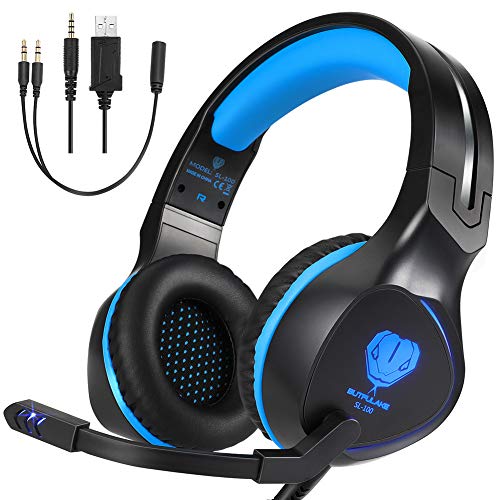
BUTFULAKE Xbox One Headset, Gaming Headset for Xbox One, Xbox One S, PS4, PC, Nintendo Switch, Laptop, Mac, Computer, 3.5mm Wired Over-Ear Gaming Headphones with LED Light & Noise Cancelling Mic, Blue
Book Details
PublisherBUTFULAKE
ISBN / ASINB07QYR76YN
ISBN-13978B07QYR76Y4
AvailabilityUsually ships in 24 hours
Sales Rank4,453
MarketplaceUnited States 🇺🇸
Description
BUTFULAKE Xbox One Headset is especially designed for game enthusiasts. We have tested and innovated many times just to pursue a more immersive gaming experience for gamers.
Tips For Setting:
♪[PC Headset] ♪
1. Y Splitter Adapter(Included) Audio Cable is needed when using the headset on computer.
2. Make sure that both Headset Microphone and Computer Microphone are turned on.
3. Double-click the Speaker icon which is in your computer taskbar to enter the Control Panel for setting the Voice.
♪[PS4 Headset]♪
1. Find the PS4 setting icon, choose "Devices"--"Audio Devices"
2. "Output Device": choose "Headset Connected to Controller"
3. "Output to Headphones": choose "All Audio"
4. Microphone Level: 80%(attention: for this option on some devices, we suggest setting on 80%)
♪[Xbox One Headset]♪
1. New Xbox One with a 3.5mm interface controller can be matched with this headset with 3.5mm plug.
2. The Old Version of Xbox One without a 3.5mm interface controller need an extra Adapter (Not Included) to match with this headset.
Notes:
1.Extra Microsoft adapter (Not Included) is needed when connect with old version Xbox One controller.
2.Not suit for Xbox 360 and PS3.
3.This gaming headset is not usb-headset, the USB interface is only used for power supply to LED light.
Specifications:
Headphones
Drivers: 50mm
Frequency Range: 20Hz-20KHz
Sensitivity: 115±3dB
Cable Length: 6.88Ft / 2.1m
Approx. Weight: 350g
Microphone
Microphone sensitivity: -38±3dB
Output Impedance: ≤2.2 KΩ
Pick-up Pattern: Omnidirectional
Headset Jack: USB±3.5mm
Package Including:
1* Gaming Headset
1* 3.5mm Splitter Cable
1* Operating Instruction
Tips For Setting:
♪[PC Headset] ♪
1. Y Splitter Adapter(Included) Audio Cable is needed when using the headset on computer.
2. Make sure that both Headset Microphone and Computer Microphone are turned on.
3. Double-click the Speaker icon which is in your computer taskbar to enter the Control Panel for setting the Voice.
♪[PS4 Headset]♪
1. Find the PS4 setting icon, choose "Devices"--"Audio Devices"
2. "Output Device": choose "Headset Connected to Controller"
3. "Output to Headphones": choose "All Audio"
4. Microphone Level: 80%(attention: for this option on some devices, we suggest setting on 80%)
♪[Xbox One Headset]♪
1. New Xbox One with a 3.5mm interface controller can be matched with this headset with 3.5mm plug.
2. The Old Version of Xbox One without a 3.5mm interface controller need an extra Adapter (Not Included) to match with this headset.
Notes:
1.Extra Microsoft adapter (Not Included) is needed when connect with old version Xbox One controller.
2.Not suit for Xbox 360 and PS3.
3.This gaming headset is not usb-headset, the USB interface is only used for power supply to LED light.
Specifications:
Headphones
Drivers: 50mm
Frequency Range: 20Hz-20KHz
Sensitivity: 115±3dB
Cable Length: 6.88Ft / 2.1m
Approx. Weight: 350g
Microphone
Microphone sensitivity: -38±3dB
Output Impedance: ≤2.2 KΩ
Pick-up Pattern: Omnidirectional
Headset Jack: USB±3.5mm
Package Including:
1* Gaming Headset
1* 3.5mm Splitter Cable
1* Operating Instruction