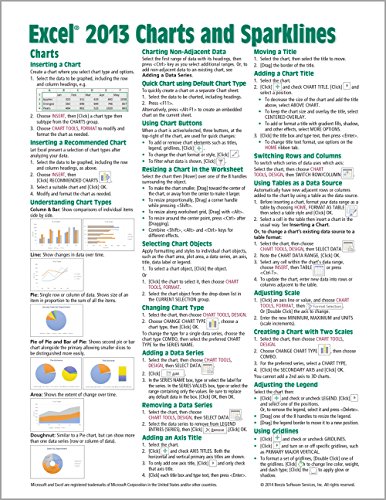
Laminated quick reference card showing step-by-step instructions and shortcuts for how to use charts/graphs and Sparklines features of Microsoft Office Excel 2013.
The following topics are covered:
Charts: Inserting a Chart, Inserting a Recommended Chart, Understanding Chart Types, Charting Non-Adjacent Data, Creating a Chart Using the Default Chart Type, Using Chart Buttons, Resizing a Chart in the Worksheet, Selecting Chart Objects, Changing Chart Type, Adding/Removing a Data Series, Adding and Adjusting Axis and Chart TItles, Switching Rows and Columns, Using Tables as a Data Source, Adjusting Scale, Creating a Chart with Two Scales, Adjusting the Legend, Using Gridlines, Adding Explanatory Text, Adding Visuals, Adding and Adjusting Data Labels, Exploding a Piece of a Pie Chart, Using Styles and Layouts, Moving a Chart to Another Worksheet, Adding a Projection or Trendline to a Data Series, Handling Hidden and Empty Cells in a Chart, Changing the Default Chart Type, Creating a Custom Chart Template, Applying a Custom Chart Type.
Sparklines: Creating a Sparkline, Grouping Sparklines, Changing Sparkline Type, Removing Sparklines, Customizing Sparklines with Text and Markers, Changing Marker Color, Change Sparklines Color and Weight, Customizing Axis Settings, Handling Hidden and Empty Cells in Sparklines.
This guide is one of multiple titles available for Excel 2013: Excel 2013 Introduction; Excel 2013 Functions & Formulas (ISBN 978-1936220779); Excel 2013 Data Analysis with Tables (ISBN 978-1936220786), Excel Advanced Features & Macros (ISBN 978-1936220809).
Microsoft Excel 2013 Charts & Sparklines Quick Reference Guide (Cheat Sheet of Instructions, Tips & Shortcuts - Laminated Card)
📄 Viewing lite version
Full site ›
Book Details
Author(s)Beezix Inc.
PublisherBeezix Inc.
ISBN / ASIN1936220792
ISBN-139781936220793
AvailabilityIn Stock.
Sales Rank869,736
MarketplaceUnited States 🇺🇸
Description ▲
Similar Products ▼
- Microsoft Excel 2013 Functions & Formulas Quick Reference Card (4-page Cheat Sheet focusing on examples and context for intermediate-to-advanced functions and formulas- Laminated Guide)
- Microsoft Excel 2013 Data Analysis with Tables Quick Reference Guide (Cheat Sheet of Instructions, Tips & Shortcuts - Laminated Card)
- Microsoft Excel 2013 Introduction Quick Reference Guide (Cheat Sheet of Instructions, Tips & Shortcuts - Laminated Card)
- Microsoft Excel 2013 Advanced & Macros Quick Reference Guide (Cheat Sheet of Instructions, Tips & Shortcuts - Laminated Card)
- Microsoft Word 2013 Introduction Quick Reference Guide (Cheat Sheet of Instructions, Tips & Shortcuts - Laminated Card)
- Microsoft Word 2013 Templates & Forms Quick Reference Guide (Cheat Sheet of Instructions, Tips & Shortcuts - Laminated Card)
- Microsoft Word 2013 Intermediate Quick Reference: Paragraphs, Tabs, Columns, Tables & Pictures (Cheat Sheet of Instructions, Tips & Shortcuts - Laminated Card)
- Microsoft PowerPoint 2013 Introduction Quick Reference Guide (Cheat Sheet of Instructions, Tips & Shortcuts - Laminated Card)
- Microsoft Outlook 2013 Mail, Calendar, People, Tasks Quick Reference (Cheat Sheet of Instructions, Tips & Shortcuts - Laminated Guide)
- Microsoft PowerPoint 2013 Advanced Quick Reference Guide (Cheat Sheet of Instructions, Tips & Shortcuts - Laminated Card)